Assumed Knowledge
In this article, I assume that you are familiar with the previous article: Forecasting Time Series: AR(p) Model. My assumed knowledge section in that article is more in depth on the basics for understanding this series of articles.
What is an MA(q) Model?
MA(q) stands for Moving-Average model of order q. This type of model is similar to an AR(p) model, except instead of being a linear combination of p previous values; it is a linear combination of q previous errors. This intends to increase the accuracy of the model, so that any shocks in previous data are accounted for. This definition, leads to the following equation:
This can be written more succinctly as:
Fitting an MA(q) Model
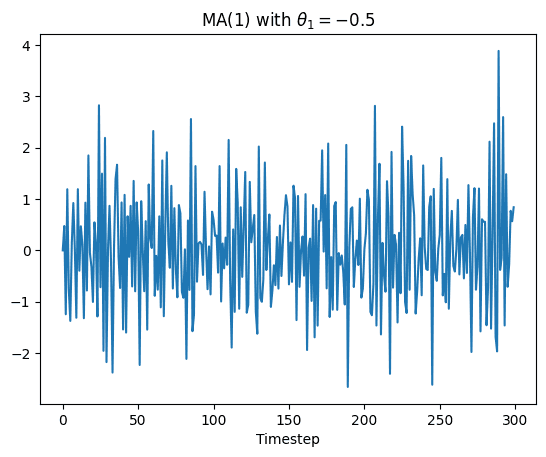
To fit an MA(q) model, we must first create some data to fit the model to. For this, I create an MA(1) model using the following equation:
We can then use the equation to create the data and then plot it using the following code:
import numpy as np
import matplotlib.pyplot as plt

N = 300
np.random.seed(4)
norm = np.random.normal(0, 1, N)
x = np.linspace(0, N)
data = np.zeros(N)
theta_1 = -0.5
for i in range(1, N):
    data[i] = theta_1 * norm[i-1] + norm[i]

plt.plot(data)
plt.title("MA(1) with $\\theta_1 = -0.5$")
plt.xlabel("Timestep")
plt.show()
This code produces the following plot:
Finding the order q to fit the MA(q) model to
We know that the data has q = 1, but if we didn’t know then we would need to find out in a similar way to how we did with the AR(p) model from the previous article. Except with an MA(q) model, we use an ACF plot to figure it out. This can be done with the following code:
from statsmodels.graphics.tsaplots import plot_acf
_ = plot_acf(data, lags=20)
Which produces this plot:
.png&w=1200&q=75)
From this graph, you can see clearly that the q = 1, as expected.
Fitting the model
To fit the model, I split the data into training and testing data. This allows us to later check how well predictions fit unseen data.
from statsmodels.tsa.arima.model import ARIMA

train_data = data[:270]
test_data = data[-30:]

model = ARIMA(train_data, order=(0, 0, 1))
model_fit = model.fit()

print(model_fit.summary())
This generates the following output:
                               SARIMAX Results
==============================================================================
Dep. Variable:                      y   No. Observations:                  270
Model:                 ARIMA(0, 0, 1)   Log Likelihood                -373.644
Date:                Sun, 21 Dec 2025   AIC                            753.288
Time:                        18:02:19   BIC                            764.084
Sample:                             0   HQIC                           757.623
                                - 270
Covariance Type:                  opg
==============================================================================
                 coef    std err          z      P>|z|      [0.025      0.975]
------------------------------------------------------------------------------
const          0.0269      0.028      0.950      0.342      -0.029       0.082
ma.L1         -0.5222      0.052    -10.002      0.000      -0.625      -0.420
sigma2         0.9312      0.087     10.686      0.000       0.760       1.102
===================================================================================
Ljung-Box (L1) (Q):                   0.18   Jarque-Bera (JB):                 1.95
Prob(Q):                              0.67   Prob(JB):                         0.38
Heteroskedasticity (H):               0.91   Skew:                             0.15
Prob(H) (two-sided):                  0.66   Kurtosis:                         2.72
===================================================================================

Warnings:
[1] Covariance matrix calculated using the outer product of gradients (complex-step).
You can see that the model fit has given us a value for the coefficient of -0.5222 with an error interval at the 95% level of [-0.625, -0.420]. So this again, is expected.
Forecasting with this model
Now to actually forecast the test data to check the validity of the model. This can be done with the following code:
forecast_result = model_fit.get_forecast(steps=30)
forecast_values = forecast_result.predicted_mean
confidence_intervals = forecast_result.conf_int()

# Plotting the results
plt.figure(figsize=(10, 5))
plt.plot(test_data, label="Actual (Test Data)")
plt.plot(forecast_values, label="Forecast", color="red")
plt.fill_between(
    range(len(test_data)),
    confidence_intervals[:, 0],
    confidence_intervals[:, 1],
    color="pink",
    alpha=0.3,
    label="95% Confidence Interval"
)
plt.title("MA(1) Forecast vs Actual")
plt.legend()
plt.show()
Running this code produces this plot:
%2520Forecast.png&w=1920&q=75)
You can see that most of the data is within the 95% confidence interval, especially earlier in the prediction. Obviously as more predictions are made, the effect of error increases so they become less reliable.