Assumed Knowledge
In this article, I assume that you are somewhat familiar with what time series data is and the difference between stationary and non-stationary data. I also assume that you have basic knowledge of simple mathematical notation. I try to explain the maths in a way that makes sense, starting with the basics of time series to more complicated functions. Don’t worry if you don’t immediately get some of what I’m describing with the maths, if you’re trying to just know how to use the model then you just need to know it’s limitations so you don’t accidentally use it in the wrong place.
What is an AR(p) Model?
An AR(p) model, otherwise known as an autoregressive model of order p, is a time series model that predicts the future value of the time series by using a linear combination of the past values of the time series. This leads to the following equation of the model, of order p:
Which can be written in it’s more commonly stated and succinct form:
How do we fit an autoregressive model?
To fit an autoregressive model we have to know what order we should fit the model with for the dataset, this can be done using partial autocorrelation. This is a type of time series analysis where the correlation between the current value at time, t, has correlation measured between it and the value at t - lag, and the values in between are regressed to remove their influence. This differentiates it from autocorrelation which is the simple process of measuring the correlation between the values at time t and the values at time t - lag.
Random Sample Data
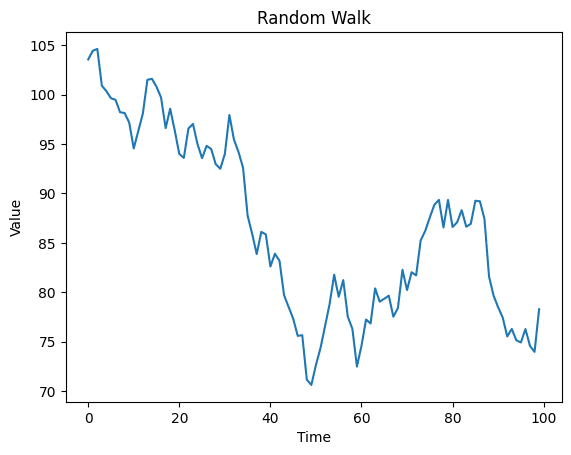
To demonstrate what autocorrelation and partial autocorrelation plots look like for a random walk of data, I created some random walk of data using the following code:
import numpy as np
import matplotlib.pyplot as plt

np.random.seed(3)
norm = np.random.normal(0, 2, 100)
data = 100 + norm.cumsum()
plt.plot(data)
plt.title("Random Walk")
plt.xlabel("Time")
plt.ylabel("Value")
plt.show()
This code produces the following graph:
Calculating Autocorrelation
Now the autocorrelation can be calculated for different lag values, which is done using the following formula:
Where z is just each value in the time series at a certain time t. R(k) is just the correlation value for a certain lag k. To run this process in python you can use the stats models library as follows:
from statsmodels.graphics.tsaplots import plot_acf
plot_acf(data, lags=20)
Running this produces the following plot:
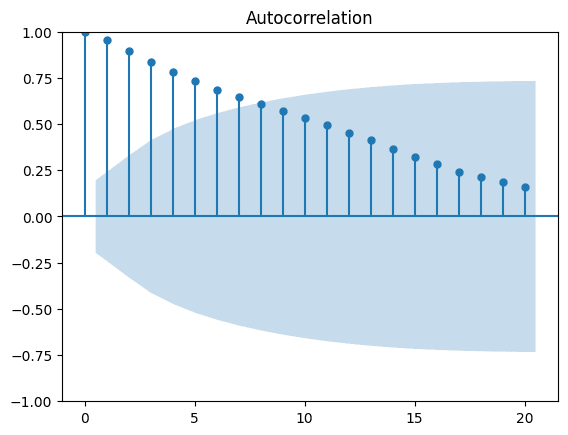
This is exactly what you’d expect for a random walk, as there is correlation between the value at the current time and many time steps before it. You can see that the series is produced by a linear combination of all previous randomly generated values, so a correlation is expected. The light blue area indicates the area that the r value would need to be within to not reject the null hypothesis of no correlation. So the data points up to a lag of 6 are correlated and the null hypothesis is rejected at the 5% level.
Calculating Partial Autocorrelation
Now partial autocorrelation is a little more complicated, calculation-wise as there is some linear regression to remove the influence of the values at shorter lags. The regression of the values at shorter lags is given by the following equations:
Notice how the coefficients from the first equation are the same but reversed in the second equation. Once these coefficient values are calculated using mean squared error, they are used to calculate the partial autocorrelation, which is given by the following formula:
You may notice that for k = 1, the values of and are equal to zero as there are no shorter lags. This leads to the following equation for a partial autocorrelation with a lag of 1:
To get the partial autocorrelation values for different lag values to be calculated in python, you can use the following code:
from statsmodels.graphics.tsaplots import plot_pacf
plot_pacf(data, lags=20)
Running this code, produces the following plot:
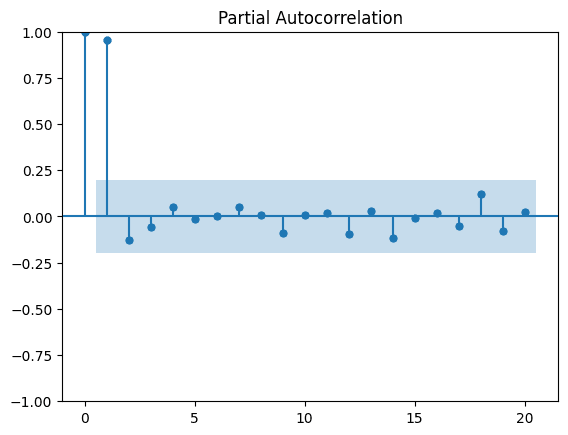
This shows us that if we fit an AR(k) model to this data, we should fit to the data with an order of 1. This is because the partial autocorrelation with lag 1 is the largest lag value that is significant.
Although, we can’t actually fit an AR(1) model to this random walk data as the coefficient is 1, which means the data is not weak-stationary as an AR(p) model requires. A constraint of this model is that the following equations must be satisfied:
Where is a complex root of the equation. So if we plug in a value of into this with no other values, then we get:
So this means that must be less than 1 for the restriction on the roots of the equation to be satisfied.
Using data that satisfies the constraints
To generate data that satisfies the constraints, all we need to do is set to a value less than 1 and make another random walk. This can be done with the following code:
import numpy as np
N = 100
np.random.seed(4)
norm = np.random.normal(0, 1, N)
x = np.linspace(0, N)
data = np.zeros(N)
beta_1 = 0.75
for i in range(1, N):
    data[i] = beta_1 * data[i-1] + norm[i]

plt.plot(data)
plt.title("Random walk with $\\beta_1 = 0.75$")
plt.xlabel("Timestep")
plt.show()
This produces this plot:
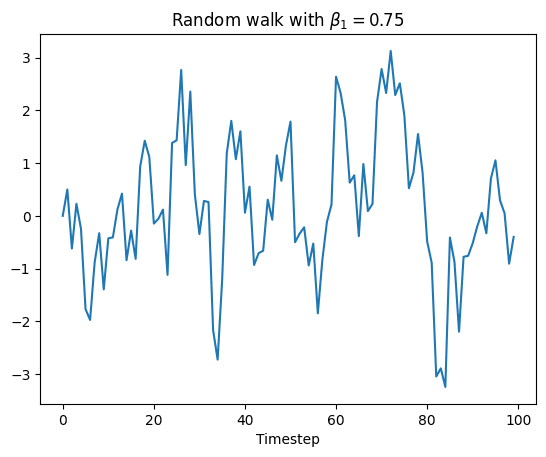
As you can see in the plot, the data is more stationary than the previous random walk. Now plotting the partial autocorrelation function gives the following graph:
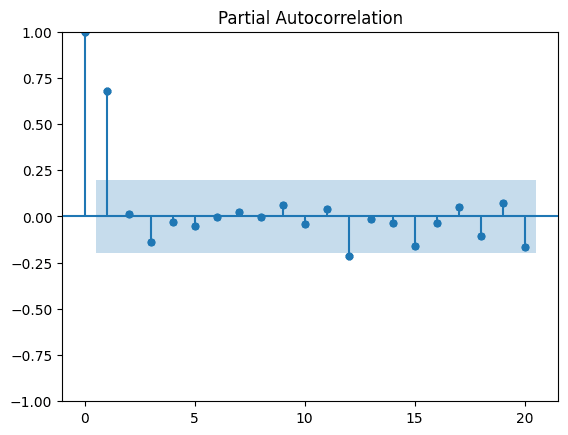
Now we can clearly see on the graph that we should model this with an AR(1) model, which is good as that’s exactly how we made the data. We can fit an AR(1) model by using the following code:
from statsmodels.tsa.ar_model import AutoReg
from sklearn.metrics import mean_squared_error
from math import sqrt

train_data = data[:90]
test_data = data[-10:]
model = AutoReg(train_data, lags=1)
model_fit = model.fit()
print('Coefficients: %s' % model_fit.params)

predictions = model_fit.predict(start=len(train_data), end=len(train_data)+len(test_data)-1, dynamic=False)

rmse = sqrt(mean_squared_error(test_data, predictions))
print('Test RMSE: %.3f' % rmse)

plt.plot(test_data)
plt.plot(predictions, color='red')
plt.show()
This creates the following output and plot:
Coefficients: [0.04825411 0.68544147]
Test RMSE: 0.546
%2520prediction.png&w=1200&q=75)
As you can see, the fit isn’t perfect but that is still quite close based on the fact that there is a random factor to this data. If you mess around with the train test split, you will notice that the more values you try to predict into the future, the less accurate the prediction as the randomness has more of an impact but for very few predictions we can get a higher accuracy on our prediction.